Blue light filter for Mac & Windows

Your screen was never meant for midnight.

Gloam changes display gamma instead of drawing a tinted window over the desktop. Choose a preset, schedule warmer evening output, and pair it with break reminders and sensible screen habits.

macOS 13+ No account required No in-app analytics Mac build signed & notarized
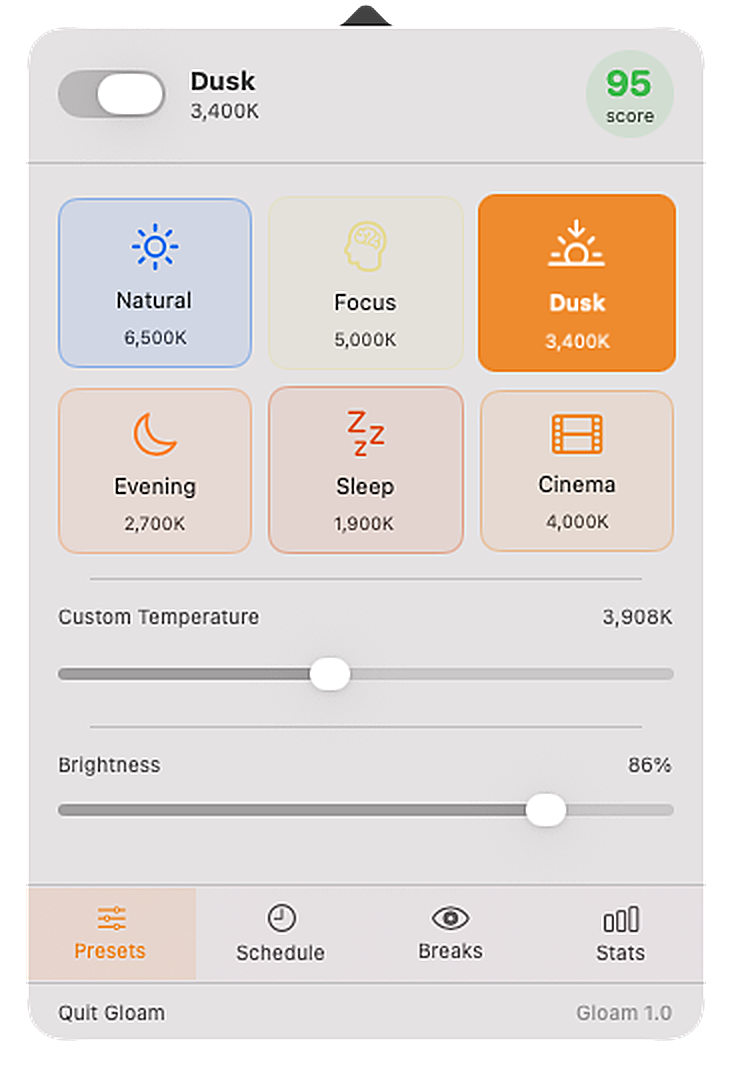
Gloam popover — live screenshot from the real app
Live screenshot · current macOS UI · light & dark mode
The difference

A color filter should work
with the display pipeline.

Some tools draw a translucent layer over the desktop. Gloam instead writes a gamma table through the operating system. That avoids an always-on overlay, while compatibility still depends on the display, adapter, driver, and HDR mode.

Overlay approach
A tinted window on top
A translucent layer can be simple, but its coverage depends on the compositor and the content being displayed.
overlay coverage varies →

  • May miss protected or exclusive-fullscreen surfaces
  • Adds an always-on composition layer
  • Coverage varies by operating system and app
Gloam — gamma ramp
Gamma-table control
On macOS, Gloam uses CGSetDisplayTransferByTable; Windows uses SetDeviceGammaRamp.
warm output
at the display level

  • Consistent across ordinary desktop content
  • No always-on overlay window
  • Display, driver, adapter, and HDR support still vary
6 crafted presets

From daylight to dim.
There's a mode for every hour.

Each preset is a repeatable software setting, not a calibrated measurement of the light reaching your eyes. The final appearance varies with the display, profile, driver, room lighting, and brightness.

☀️ Natural — 6500K
Identity gamma table
Gloam does not add a warm shift. Your display profile and hardware still determine the actual output.
🧠 Focus — 5000K
Slightly neutral-warm
A gentle warm shift for users who prefer less dramatic color change in brighter rooms.
🌅 Dusk — 3400K
Warm ambient light
A visibly warm option for early evening. It changes screen color; it does not guarantee a circadian or sleep outcome.
🌙 Evening — 2700K
Incandescent warmth
A strong warm shift intended for dim evening rooms. It will noticeably distort color.
💤 Sleep — 1900K
Deep amber, strongest blue-channel reduction
Gloam's warmest preset. It substantially alters color and is not presented as a treatment or sleep guarantee.
🎬 Cinema — 4000K
Film projection warmth
Moderate warmth without preset dimming. It still changes color and is unsuitable for color grading.
How it stacks up

Built-in controls or a dedicated app?

Start with the option that meets your actual needs. Apple and Microsoft already include basic warmth and scheduling; Gloam adds named presets, break prompts, per-app profiles, and local usage feedback.

Gloam 1.0.3 macOS Night Shift Windows Night light Official sources
Availability macOS 13+ and Windows 10/11 x64 Included with supported Macs Included with Windows 10/11 Gloam · Apple · Microsoft
User control Six named settings plus manual 1900K–6500K control Warmer-color slider Strength slider Gloam · Apple · Microsoft
Scheduling Approximate sun-based schedule on Mac; user-entered times on Windows Custom or sunset-to-sunrise Set hours or sunset-to-sunrise Gloam Mac / Windows · Apple · Microsoft
Additional tools Configurable breaks, per-app presets, and a local activity score Integrated with macOS and Control Center Integrated with Windows display settings Gloam · Apple · Microsoft
Important limitation Gamma behavior varies by display path; Windows HDR can ignore gamma ramps External-display behavior depends on the display Unavailable with some drivers, including DisplayLink or Basic Display Gloam · Apple · Microsoft

Last checked: July 19, 2026. Every row links to first-party product documentation. See the full cited comparison, which also covers f.lux. Features can change; confirm current third-party behavior with its publisher.

Everything Gloam does

The full feature list.

Current behavior in version 1.0.3, with limitations called out where operating-system or display behavior can vary.

🖥️
Driver-level gamma filtering
Uses Core Graphics RGB gamma tables on Mac and SetDeviceGammaRamp on Windows rather than an overlay window. Compatibility depends on the display path. Apple API reference
🎨
6 hand-tuned presets
Natural (6500K), Focus (5000K), Dusk (3400K), Evening (2700K), Sleep (1900K), Cinema (4000K). Each with smooth animated transitions between 1–3 seconds.
🌅
Circadian auto-schedule Pro
On Mac, uses approximate location to estimate sunrise and sunset; Windows 1.0.3 uses times entered by the user. Calculated sun times can differ from observed conditions. NOAA calculation limitations
🎚️
Manual temperature & brightness sliders
Manual software controls from 1900K–6500K and 30–100% brightness. Values are UI targets, not measurements of a monitor's emitted spectrum or luminance.
👁️
20-20-20 break engine
Full-screen break overlay every 20 minutes (configurable: 15, 20, 30, 45, or 60 min). Countdown timer, amber ambient design, skip button. Entirely optional — toggle off and it disappears completely.
📊
Live eye comfort score
A local 0–100 activity score calculated from filter use, selected warmth, and recorded breaks. It is a product heuristic, not a clinical measurement or health assessment.
📱
Per-app filter profiles Pro
Assign a preset to detected foreground apps. Matching uses bundle identifiers on Mac and executable filenames on Windows; switching timing can vary with operating-system events.
⌨️
Global hotkey preset cycling Pro
Press ⌘⇧I from any app to step through presets without opening the popover. The cycle order follows the warmth gradient — Natural → Focus → Dusk → Evening → Sleep.
🗓️
Manual sunrise/sunset times
Enter sunrise and sunset times yourself instead of using location on Mac. Windows 1.0.3 uses manual times for its schedule.
Instant filter toggle
One click in the menu bar popover toggles the filter off entirely. Your preset is remembered — click again and it comes straight back. Good for color-critical moments.
🔒
Local-first operation
Version 1.0.3 does not require an account and is designed without product analytics or telemetry. App settings are stored locally. This describes the current build, not external download or payment services. Privacy policy
🌓
Light, dark & system appearance
Choose a fixed light or dark popover theme, or follow macOS. Redesigned tab bar and higher-contrast score colors so labels stay readable in every mode.
🚀
Launch at login on Windows
The Windows build can add a current-user startup entry for the EXE's current path. Automatic launch registration is not currently offered by the Mac build.
🖥️
Multi-display support
Gloam attempts to apply a gamma ramp to each detected display. Results vary with monitor, adapter, HDR mode, graphics driver, and operating-system support.
🪟
Windows version
Available for Windows 10 (1809+) and Windows 11 x64. It uses Windows GDI gamma tables; HDR and some display drivers can ignore those changes. The current EXE is unsigned.
🔒 Greyed-out features require Gloam Pro — $14.99 one-time. Free includes 3 presets, sliders, basic break reminders, and the menu bar comfort score. See plans →
20-20-20 breaks

A visible cue to look away and reset.

The 20-20-20 rule is a widely used reminder to interrupt sustained near focus, but the exact interval is not a proven medical dose. Gloam supplies a configurable prompt; it does not diagnose or treat digital eye strain. AAO EyeWiki overview

  • Full-screen overlay — can't be clicked past accidentally
  • Countdown timer so you know exactly when it's over
  • Skip button for the meetings that run long
  • Configurable interval: 15, 20, 30, 45, or 60 minutes
  • Entirely optional — toggle off and it's gone
👁
Rest your eyes
Look at something 20 feet away and blink naturally.
9
Skip break
Pricing

Simple. Honest. No subscription.

One payment for the Pro license. No recurring subscription. Future operating-system compatibility can change and is not guaranteed indefinitely.

Free
$0
no time limit stated for the free tier · no card required
  • 3 presets (Natural, Dusk, Sleep)
  • Manual temperature slider
  • Manual brightness control
  • Basic 20-20-20 break reminders
  • Menu bar eye comfort score
  • Circadian auto-schedule (GPS)
  • All 6 presets + Cinema mode
  • Per-app filter profiles
  • Break stats & history
  • Windows version (free)
Download free →
✦ Most popular
Pro
$14.99
$19.99
Launch price — lifetime license
one-time license · no recurring subscription
  • Everything in Free
  • Lifetime license — no subscription
  • All 6 presets including Cinema
  • Circadian auto-schedule with GPS
  • Per-app filter profiles
  • Break stats, streaks & history
  • Global hotkey preset cycling (⌘⇧I)
  • Pro features on Windows too
  • Email support
  • Updates released for this license
Buy Gloam Pro — $14.99 lifetime
One payment. No recurring subscription. 30-day money-back guarantee.

Email us with any questions — we actually respond.  ·  30-day money-back guarantee on Pro.

🪟 Windows 10 / 11
Gloam is now on Windows.
Same driver-level gamma ramps, same redesigned popover, same light/dark/system theme switch — built on WPF, packaged as a portable self-contained EXE. Unzip and run.
↓ Download for Windows
Practical resources

Set it up well. Use it honestly.

Platform-specific instructions, transparent comparisons, and evidence-aware screen comfort guidance—not recycled feature copy.

Common questions about Gloam

How is Gloam different from macOS Night Shift?

Night Shift is built into macOS and provides warmth controls plus custom or sunset scheduling. Gloam adds six named settings, manual 1900K–6500K control, per-app profiles, brightness control, and configurable break prompts. See Apple's Night Shift documentation.

Does it work on Apple Silicon?

The current Mac build contains an arm64 executable and runs as a menu-bar process on supported Apple Silicon Macs. Compatibility can still vary with macOS updates and display hardware.

Does it work with external monitors?

Gloam attempts to write a gamma table to each detected display. Some monitors, HDR modes, DisplayLink paths, projectors, and graphics drivers may ignore or limit the change, so test every display you rely on.

Will it interfere with color-accurate work?

Natural (6500K) uses an identity gamma table, so Gloam adds no warm shift; the monitor profile and hardware still determine output. Turn filtering off before judging white balance, print proofs, or brand colors.

What does "per-app profiles" mean?

With Pro, you can assign a preset to detected apps—for example, Natural for Preview or Lightroom while the general setting is Evening. Matching uses bundle identifiers on Mac and executable filenames on Windows; switching follows foreground-app events from the operating system.

Is there a free trial for Pro?

The Free tier is a real product, not a crippled trial. Use it as long as you want. If you upgrade and it's not right, there's a 30-day money-back guarantee — no questions asked.

How can I verify the Mac download?

The current v1.0.3 DMG is signed with an Apple Developer ID certificate for Jarod Rivera / JTR Labs (Team ID XX6K7235XN), has a stapled notarization ticket, and is accepted by Gatekeeper as Notarized Developer ID. Apple explains that signing verifies publisher identity and integrity, while notarization reports that Apple found no known malware at review time; neither is a universal safety guarantee. Compare the pinned SHA-256 below before opening it. Apple code-signing explanation

Your eyes have been waiting for this.

Free to start. Runs quietly. Use warmer evening color together with breaks, comfortable lighting, and a consistent wind-down routine.

↓ Download for Mac — Free ↓ Download for Windows — Free Compare plans

macOS 13+ · Apple Silicon native · 5.1 MB · Windows 10 (1809+) / 11 · x64 self-contained · 63.2 MB · v1.0.3 (June 9, 2026)

Verified release integrity

Gloam v1.0.3 artifacts verified July 19, 2026. View the pinned GitHub release.

macOS:

  • Developer ID signature verified — the current DMG and app are signed by “Developer ID Application: Jarod Rivera (XX6K7235XN).”
  • Apple notarization verified — the stapled ticket validates and Gatekeeper accepts the current DMG as Notarized Developer ID.
  • Hardened runtime verified — the current app signature includes Apple’s hardened-runtime flag and satisfies its designated requirement.
  • Local-first app design — version 1.0.3 requires no account and includes no product analytics or telemetry in the reviewed app source. External download and payment services have their own data practices; see the privacy policy.
  • Drag to Applications — standard macOS install; uninstall by deleting Gloam.app.

Windows:

  • Archive integrity verified — the current ZIP passes an integrity test and its SHA-256 matches GitHub’s release digest.
  • Unsigned Windows executable — the current EXE has no Authenticode signature. SmartScreen may warn, and Smart App Control can block unsigned apps without a per-app bypass. Do not weaken a managed security policy to install it. Microsoft Smart App Control FAQ
  • Gamma-table implementation — uses Windows GDI SetDeviceGammaRamp for detected monitors; HDR and some drivers can ignore or restrict the result.
  • Local settings — version 1.0.3 stores settings in %APPDATA%\Gloam\state.json and does not require an account. Uninstall by deleting the EXE and, if desired, that folder.
SHA-256 (macOS DMG):
5b95ad1c84fc6442bcb7f2093588e7dbbe6f49ecb2c24a55cfaef6b59ccd8a7d
SHA-256 (Windows ZIP):
f83cb770a5ba32c05dea2ef355d8d1a31cb6b3fdf509c0090b7fefc6538e5100
Team ID XX6K7235XN · release.json · release-windows.json